Pet Carrier Icons: Simple, Clean Vector Graphics for Almost Any Project
If you’ve ever tried to design a flyer for a pet-sitting service or create icons for a pet-related mobile app, you know how much time goes into getting the details right. You want something clear, professional, and easy to adapt. That’s exactly where Pet Carrier Icons come in. This set of vector graphics gives you a handful of well-drawn pet carrier symbols that work across digital and print projects. But more than that, they save you from starting from scratch every time you need a visual for “traveling with pets” or “pet transport.”
What Exactly Are Pet Carrier Icons?
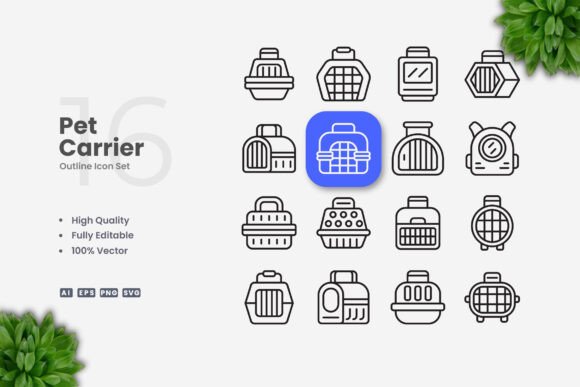
Pet Carrier Icons is a collection of vector illustrations that focus on one practical subject: pet carriers. Think crates, soft-sided carriers, kennels, and related transport gear for cats, dogs, and other small animals. Each icon is designed with a simple, clean style—no clutter, no overly detailed lines. That simplicity makes them incredibly versatile. You get the essential shape and silhouette of a pet carrier without extra decoration that might clash with your own branding or layout.
The files come in formats that work with almost any design software: Adobe Illustrator (.ai), EPS version 10, SVG, and PNG with transparency. That means you can open them in programs like Illustrator, CorelDRAW, Affinity Designer, or even free tools like Inkscape. The vector files are fully customizable. You can resize them without losing quality, change colors to match your palette, and even adjust the stroke weight if you want a bolder or thinner line.
One important note: the preview mockup shown in the product listing is not included. What you get are the source files themselves, ready for you to drag and drop into your projects.
Where Pet Carrier Icons Fit Into Real Workflows
Practical use cases are where these icons really shine. Let’s walk through some common scenarios, from professional to personal.
Building a Pet-Care Website or App
If you run a local pet-sitting business or develop a mobile app for pet owners, icons are essential for navigation and user experience. Pet Carrier Icons can become the visual cue for a “travel mode” feature, a “crate training” section, or a booking option for pet transport. The clean design ensures they load fast and scale cleanly on retina screens. A developer might drop the SVG file directly into an interface, while a designer could use the AI or EPS version to tweak the line thickness to match other app icons.
For a boarding kennel’s website, you might use the icon on the “pickup and drop-off” page to reassure customers that you handle transport safely. The icon becomes a subtle trust signal.
Social Media and Blog Graphics
Pet bloggers and social media managers often need quick visuals for posts about traveling with pets. A pet carrier icon works perfectly as a background element, a callout graphic, or a bullet point marker in an infographic. Because the design is simple, it won’t distract from the text or photo overlay. You can change its color to match your brand’s Instagram palette in seconds using vector software.
Say you’re writing a blog post titled “5 Tips for Flying with Your Cat.” You could place a small carrier icon next to each tip. It’s a subtle way to keep the content scannable and visually consistent. No need to hire an illustrator for such a straightforward need—the vector file gives you all the flexibility.
Print Materials: Flyers, Posters, and Banners
Small business owners running pet services often rely on printed materials for local marketing. A flyer for a new dog boarding facility, a poster for a pet adoption event, or a banner for a pet supply store—all benefit from clear, readable icons. Pet Carrier Icons work well here because they print crisply at any size. The EPS format is especially handy for print shops that prefer vector files.
Imagine designing a flyer for a “Pet Taxi” service. You can place a carrier icon next to the service description. It immediately communicates what the business does without a photo of an actual carrier, which might look messy or dated. Plus, you can adjust the stroke weight on the icon to match the weight of your headline text, creating a cohesive look.
Books and Educational Materials
Authors writing children’s books about pets, or educators creating worksheets about animal care, often need simple illustrations. The clean style of Pet Carrier Icons fits right into educational contexts. A teacher preparing a lesson on how to prepare a pet for a car trip might use the icon in a handout. Self-publishers can insert the SVG or PNG into an ebook without worrying about resolution.
Because the icons are vector, they can be enlarged to fill a whole page without pixelation. That’s something a raster image cannot do. For a book on pet travel tips, the carrier icon could be the chapter marker or a recurring motif.
Infographics and Presentations
Marketers and educators who create infographics need icons that are easy to embed and resize. Pet Carrier Icons can be the visual anchor for statistics about pet travel or crate training. For example, in an infographic comparing carrier types, three separate carrier icons can represent soft-sided, hard-sided, and backpack carriers. The consistent style keeps the infographic looking professional.
In a PowerPoint presentation for a veterinary conference, you might use the icon on a slide about “Safe Pet Transport.” The clean lines ensure it’s visible from the back of a large room. No messy details get lost in projection.
Who Benefits Most from This Set?
While the icons are useful across many fields, some groups get extra value from the specific design and features.
Freelance designers and agencies often take on projects from different clients. Having a set of clean pet carrier icons in your library saves time when a client needs a pet-related graphic. You can customize the color and stroke to fit the brand guidelines quickly. The AI source file with editable strokes is a big time-saver compared to redrawing something from scratch.
Hobbyists and hobbyist bloggers who don’t have a large design budget will appreciate the PNG transparency files. You can use them directly in Canva or similar tools without needing vector software. Just drop the PNG over your background—no clipping or extra work needed.
Small business owners who prefer to DIY their marketing materials will find the vector files forgiving. If you’re not a professional designer, the simplicity of the icons reduces the risk of a poor design choice. You can focus on your message instead of agonizing over icon aesthetics.
What to Consider Before Using Pet Carrier Icons
Before you download and use any icon set, it helps to think about how well it matches your specific needs. Pet Carrier Icons are intentionally minimal. If your project requires highly detailed, realistic representations of carriers, this set may not be the best fit. The strength here is in its simplicity and adaptability.
Think about color. The icons likely come with default strokes. In vector software, you can change the fill and stroke color easily. But if you’re not comfortable using layers and color swatches, the PNG files might be more straightforward, though you cannot change their color after export. Check the file format you need before committing to a workflow.
Also consider the number of icons. The product likely includes a specific set of carrier variations. Read the description to confirm it covers the carrier types you plan to use—such as a top-loading crate, a side-door kennel, or a backpack carrier. If you need all three, make sure they’re in the pack.
Because the preview mockup is not included, you won’t receive a pre-designed flyer or poster. You are getting the raw icons. That’s actually a plus for customization, but it means you need to do the layout yourself. If you’re a beginner, there are plenty of online tutorials for placing and editing vector files in free software like Inkscape.
Lastly, check the license if you plan to use the icons in commercial products (like a printed book for sale or an app with a price tag). Most icon sets come with a standard commercial license, but it’s always wise to verify the terms. This particular set appears intended for broad use, but confirm that it covers your specific use case, especially if you plan to resell the icons themselves.
Why Simple and Clean Icon Design Matters
In a world where people are bombarded with visuals, simplicity stands out. Clean icons communicate a message quickly. A pet carrier icon should show exactly what it is—no extra lines or ornaments to decode. That’s why the simple and clean icon design of this set works so well for multiple media. Whether on a website header, a social media story, or a printed banner, the icon does its job without screaming for attention.
Editable stroke weight is another feature worth highlighting. If your project uses thick lines for all graphics, you can adjust the icon’s stroke weight to match. If you prefer a thin, modern line art look, you can thin it out. That level of control makes the set adaptable to different design trends, not just a single style.
The vector formats ensure future-proofing. If you create a poster today and want to repurpose the icon for a billboard next year, you can open the AI file and scale it up without redoing anything. That’s especially valuable for businesses that update their branding over time.
Putting Pet Carrier Icons to Work in Your Next Project
Let’s walk through a quick example: You run a pet adoption nonprofit. Your team needs a one-page flyer for an adoption event that includes information about transporting newly adopted pets home. You want a small icon next to the line “Bring a carrier for your new friend.” You open the SVG file in your design tool, change the color to match your organization’s blue, scale it down to fit next to the text, and export the flyer as a PDF. Total time: less than five minutes. The result looks professional and intentional, not like you grabbed a clip art from the internet.
Another scenario: You’re a teacher creating a slide deck about responsible pet ownership for a third-grade class. You insert the carrier icon onto the slide about traveling with pets. The kids immediately understand because the icon is clean and recognizable. You didn’t have to draw anything by hand or find a photo that might confuse them.
These are the kinds of real situations where Pet Carrier Icons deliver value without extra effort. They aren’t flashy, and they aren’t trying to be. They are practical tools for everyday design needs.
If you are looking for a way to add a consistent, professional pet carrier symbol to your work—whether you are a marketer, educator, small business owner, or hobbyist—this icon set gives you a reliable starting point. With the ability to resize, recolor, and adjust strokes, you maintain control over the final look. And the multiple file formats mean you can use them whether you are working in advanced design software or a simple drag-and-drop tool.
Just remember that the preview mockup is for illustration purposes only. The actual purchase gives you the source files. But once you open those files, the possibilities are wide open. From a poster on your local pet shop’s wall to a mobile app icon on someone’s phone, Pet Carrier Icons can find a home in your next project.