Moon Icons: Simple, Clean Vector Icons for Every Creative Project
Icons are the visual shorthand of modern design. They guide users, communicate ideas instantly, and add polish to everything from a mobile app to a printed brochure. Moon Icons offer a straightforward solution for anyone who needs high-quality, minimalist icons that work across digital and print media. This set focuses on clean lines, consistent styling, and maximum versatility — making it a practical choice for beginners and seasoned designers alike.
What Are Moon Icons?
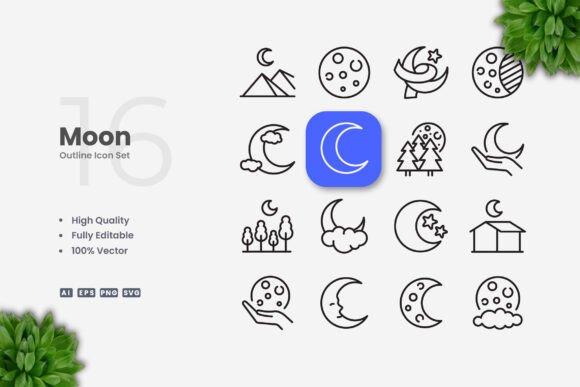
Moon Icons is a collection of vector-based icons designed with simplicity in mind. Each icon features a crisp, uncluttered outline that fits naturally into modern interfaces and layouts. The set includes 100 unique vector files, all fully customizable. Because the icons are built as vectors, you can resize them without losing quality, change their color to match your brand, or adjust the stroke weight to suit your design style. Whether you're working on a website, a mobile app, a social media graphic, or a printed flyer, these icons provide a consistent visual language that feels both contemporary and timeless.
The core appeal lies in their clean aesthetic. There are no unnecessary details, no busy patterns — just clear, recognizable shapes that communicate at a glance. This makes them especially useful for projects where clarity and professionalism matter, such as business presentations, educational materials, or product interfaces.
Why Choose a Simple Icon Set?
Many icon collections lean toward elaborate illustrations or highly stylized designs. While those have their place, simple and clean icons often prove more versatile in real-world use. Here are a few reasons why a minimalist set like Moon Icons can be a smart choice:
- Universal readability: Simple outlines are easy to recognize across different screen sizes, print formats, and cultural contexts. Users don't have to guess what an icon represents.
- Easy customization: With fewer design elements, it's faster to tweak colors, strokes, and sizes without breaking the visual balance. You can adapt them to light or dark backgrounds, change accent colors, or scale them from tiny app icons to large poster graphics.
- Consistent branding: A unified icon style helps maintain a cohesive look across all your materials. Whether you're designing a website, a social media template, or a product manual, the icons reinforce your brand identity without adding visual noise.
- Time savings: Starting with a ready-made set of editable vectors saves hours of drawing from scratch. You can focus on layout and messaging rather than icon production.
For freelancers, small business owners, and marketers who juggle multiple projects, this efficiency is a real advantage.
Practical Uses Across Projects
Moon Icons can be applied in numerous contexts. Here are some realistic scenarios where this icon set shines:
Websites and Mobile Apps
Icons play a critical role in user interfaces. They label navigation menus, highlight call-to-action buttons, and represent features. With Moon Icons, you can quickly populate a website header with intuitive icons for Home, About, Services, Contact, and more. The editable stroke weight lets you match the icon thickness to your site's typography, creating a harmonious design. For mobile apps, the clean outlines scale down beautifully on small screens, maintaining legibility without pixelation.
Social Media and Marketing Graphics
Social media posts often rely on icons to break up text and add visual interest. A set of Moon Icons can be used to create infographics, highlight key statistics, or illustrate step-by-step guides. Because the files include SVG and PNG formats, you can upload them directly to platforms like Instagram, LinkedIn, or Facebook. Changing the icon color to match a campaign palette takes only a few clicks in vector software.
Print Materials: Flyers, Banners, and Posters
Print design demands high-resolution graphics. Vector icons are ideal because they remain sharp at any size. Moon Icons can be placed on flyers to indicate contact info, event details, or special offers. On banners and posters, they serve as visual anchors that guide the viewer's eye. The included EPS and AI files work seamlessly with Adobe Illustrator and CorelDRAW, so resizing and color adjustments are straightforward.
Educational and Business Documents
Teachers, trainers, and business professionals often create handouts, presentations, and manuals. Icons help make complex information more digestible. Use Moon Icons to illustrate processes, categorize topics, or add visual cues to slides. Because the icons are simple, they won't distract from the content — they'll enhance it.
E-books and Digital Publications
E-books and PDFs benefit from consistent iconography. Moon Icons can mark chapter headings, list items, or key takeaways. The PNG transparency ensures they layer cleanly on any background. If you're self-publishing, the editable vector files allow you to adjust icon size and color to match your book's interior design.
Key Features That Matter
Understanding what comes in the package helps you evaluate whether Moon Icons fits your workflow. Here's a breakdown of the included files and their practical use:
- Source File Ai: The Adobe Illustrator file gives you full access to all icons in their original vector form. You can edit any path, apply gradients, or combine icons.
- EPS Version 10: A widely compatible vector format that opens in most design applications, including older software versions.
- SVG File: Scalable Vector Graphics are perfect for web use. You can embed them directly into HTML or use them in design tools like Figma and Sketch.
- PNG Transparency: Ready-to-use raster images with transparent backgrounds. Great for quick placements where you don't need to edit the icon itself.
- Readme.txt: A simple instruction file that explains the folder structure and file usage. Helpful if you're new to working with icon sets.
All files are drag-and-drop ready, so you can start using them immediately after download. The editable stroke feature is particularly useful — you can make icons thinner or thicker without reconstructing them, which is a common need when adapting icons to different design contexts.
What to Consider Before Using Moon Icons
While this icon set is versatile, a few practical points are worth keeping in mind:
- Vector software required for editing: To change colors, resize, or adjust strokes, you'll need a vector application like Adobe Illustrator or CorelDRAW. If you don't have access to these, free alternatives like Inkscape or Vectr can also open SVG and EPS files, though some advanced edits may be more limited.
- Preview mockups are not included: The set contains the icon files themselves, not staged product mockups. This is standard for icon packs, but if you're expecting ready-made presentations, you'll need to create those separately.
- Number of icons: 100 icons is a solid foundation for most projects, but if your project requires a very specialized or niche set, you may need to supplement with additional icons. For general use — web, mobile, print, social media — the variety is sufficient.
- Styling consistency: All icons share the same visual style, which is great for cohesion. However, that also means they may not blend perfectly with icons from other sets. If you're mixing sources, plan to adjust stroke weights and colors to achieve a unified look.
These aren't drawbacks, but practical boundaries that help you decide if the set aligns with your specific needs.
Getting Started with Moon Icons
If you're new to working with vector icons, here's a simple workflow to begin:
- Unzip the downloaded folder and review the Readme.txt for organization.
- Open the AI or EPS file in your vector software. Browse the icons to see what's available.
- Select an icon and copy it into your project file. Use the software's direct selection tool to adjust the stroke weight or fill color.
- Scale the icon to your desired size. Because it's vector, it will remain sharp.
- Export as PNG, SVG, or any format your project requires.
This process takes minutes and gives you full control over the final appearance. For social media graphics, you might keep icons in their original outline style. For a branded website, you could apply your brand color as a fill or accent stroke. The flexibility is there.
Moon Icons are designed to be a practical resource, not a complicated tool. Whether you're creating a personal blog, launching a small business website, or preparing educational handouts, these icons can save you time while adding a professional touch to your work. Their simple and clean design ensures they won't look outdated next year, and the editable vector files mean you can adapt them as your project evolves. If you value clarity, consistency, and ease of use, this icon set is worth considering.