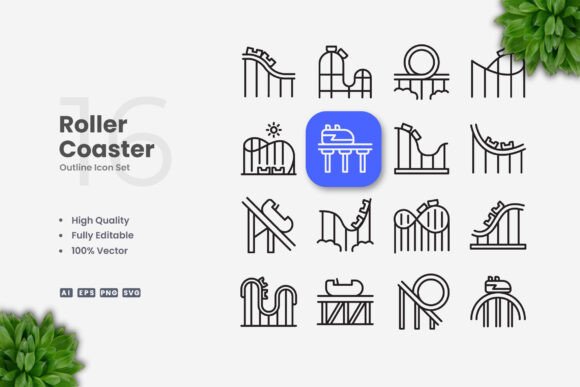
Roller Coaster Icons: Clean Design for Modern Projects
When you need a visual that communicates excitement, motion, or entertainment, few symbols work as well as a well-crafted roller coaster icon. The sharp lines, dramatic loops, and upward climbs instantly evoke amusement parks, thrill rides, and unforgettable experiences. But beyond the immediate association, roller coaster icons have become a versatile design element for digital and print projects.
What makes them so useful is their blend of energy and simplicity. A clean, vector-based roller coaster icon can be adapted for everything from a mobile app button to a poster headline, without losing its impact. The key is starting with a design that is intentionally minimal—stripped of unnecessary details—so you can resize, recolor, or edit the stroke weight without breaking the silhouette.
Why Vector-Based Roller Coaster Icons Work
Vector icons are the backbone of modern design workflows. Unlike raster images, vectors use mathematical paths, which means they scale infinitely without losing crispness. A roller coaster icon in vector format can be used at 16 pixels for a navigation bar or blown up to 2000 pixels for a banner, and it will remain sharp on any screen or print medium.
The editable stroke feature of these icons adds another layer of flexibility. Stroke weight affects the visual weight of the icon: a thin stroke feels elegant and modern, while a thicker stroke gives a bolder, more playful vibe. You can adjust this in Adobe Illustrator or CorelDRAW in seconds, tailoring the icon to match your brand’s tone.
Because the files come in AI, EPS, SVG, and PNG formats, you are not locked into one tool. SVG is particularly useful for web developers who need scalable graphics without extra server calls, while AI and EPS preserve layers and editable paths for professional designers. The included readme.txt ensures you know exactly what you are working with.
Creative Ways to Use Roller Coaster Icons
A roller coaster icon is far more than a clipart of a theme park. It can represent concepts like rising momentum, thrilling progress, or a journey with ups and downs. Here are some practical applications that go beyond the obvious.
1. Infographics and Data Visualization
Use a roller coaster icon to mark a peak on a timeline, highlight a major milestone, or illustrate a process that involves risk and reward. For example, in a business infographic about startup growth, an icon showing the steep drop and loop can visually represent the volatile early stages before a steady climb. The clean vector design ensures the icon does not clutter the data—it complements it.
Because you can change the color to match your palette, the icon can be used as a recurring motif. A session about “thrill of innovation” could use a roller coaster icon at each key turning point, reinforcing the narrative without adding extra text.
2. Mobile App and Website UI
In user interfaces, icons need to be instantly recognizable at small sizes. A simple roller coaster icon works perfectly for categories like “Amusement,” “Events,” or “Travel.” For a theme park app, you might use it as the home button. For a productivity app, the icon could represent “fast execution” or “dynamic workflow.”
The editable stroke allows you to match the icon’s thickness to the app’s UI style. If your design system uses 2px strokes for all icons, you can adjust the roller coaster’s lines to be consistent. This attention to detail makes the interface feel cohesive and professional.
3. Social Media and Marketing Graphics
Instagram stories, Facebook ads, and LinkedIn banners all benefit from strong visual symbols. A roller coaster icon can serve as a focal point in a promotional graphic for a product launch, a sales event, or a motivational post. The icon’s upward trajectory naturally suggests growth and excitement.
For a flyer promoting a summer fair, use the icon alongside typography to create a balanced layout. Because you can change the color, you can make it punchy for a limited-time offer or muted for an elegant invitation. The PNG transparency file is handy for quick compositing in tools like Canva or Photoshop.
4. Print Collateral: Books, Posters, and Flyers
Print projects demand high-resolution art. The vector format ensures your roller coaster icon prints cleanly at 300 DPI without pixelation. For a children’s book about a day at the amusement park, the icon can be used as a chapter header or a repeating pattern on the endpapers. For posters, a large, single icon can dominate the composition, with minimal text for a modern look.
The ability to edit the stroke weight is especially useful for print. Thicker lines hold up better on newsprint or textured paper, while thinner lines are ideal for glossy magazines. You can also combine the icon with other elements from the same vector set to create a cohesive visual language.
Adapting the Icon for Different Audiences
Your audience’s expectations will guide how you use the icon. For a corporate presentation about market volatility, the roller coaster icon should be simple and restrained—maybe a single line in a neutral gray. For a children’s birthday invitation, you can fill the loops with bright colors and use a chunky stroke. The beauty of a clean vector icon is that it can be both sophisticated and playful depending on the context.
Entrepreneurs and small business owners can repurpose the icon across multiple channels. Use it in your email newsletter header, on your landing page, and in your social media cover photo. Consistent use of the same icon (with color variations) reinforces brand recall without requiring a complex design system.
Educators and hobbyists will appreciate the low barrier to entry. You don’t need to be a seasoned illustrator: open the AI file, select the icon, and recolor it to match your project. The included SVG can even be edited in a text editor for advanced web developers who want to animate the paths using CSS.
Practical Tips for Working with Vector Icons
- Resize with caution – Even though vectors scale infinitely, extremely small sizes may benefit from simplifying the shape. If you use the icon at 16px, consider thickening the stroke slightly to maintain visibility.
- Change color strategically – Use palette tools to extract colors from your brand or surrounding visuals. A monochromatic icon often feels more sophisticated than a multicolored one, but for children’s content, multiple colors work well.
- Edit stroke weight consistently – If you are using multiple icons in a set, keep the stroke weight uniform. This creates a cohesive look, especially in UI design or infographics.
- Combine with text – A roller coaster icon pairs well with headings that suggest motion (“Race Ahead,” “The Thrill of Progress”). Place the icon next to the headline to draw the eye.
- Test on different backgrounds – Transparent PNGs are great for overlaying on photos, but ensure sufficient contrast. You can add a subtle drop shadow or outline if the background is busy.
How to Maintain Originality While Using Ready-Made Icons
Using pre-designed vector icons is not a shortcut to lazy design—it is a toolkit for efficiency. The creativity comes in how you customize and combine them. Rotate your roller coaster icon 90 degrees to represent a loop as a “cycle.” Duplicate it to form a pattern. Use only half the track to suggest a climb. These small tweaks turn a generic asset into something unique to your project.
Remember that the icon is a starting point. You can overlay it with texture, mask it into a shape, or animate its path with SVG motion. The clean design gives you room to experiment without fighting with noisy details.
Final Recommendations
Whether you are a designer preparing a batch of social media templates, a marketer building a conference brochure, or an entrepreneur creating your own pitch deck, having a reliable set of roller coaster icons saves time and ensures professional results. The included file formats cover every modern use case: web (SVG), print (AI/EPS), and quick composites (PNG). The editable stroke and color options mean you can adapt the icon to any brand without starting from scratch.
Focus on the story you want to tell. A roller coaster icon is more than an illustration—it is a symbol of motion, excitement, and resilience. Use it with purpose, keep the design clean, and let the vector do the heavy lifting.