Modern Building Icons: A Practical Guide for Designers and Content Creators
When you need visual shorthand for architecture, real estate, or urban development, a well-crafted icon set can save hours of design time. Modern Building Icons is a vector collection designed for professionals who want clean, scalable symbols that work across print and digital media. But like any design resource, it has specific strengths, limits, and ideal use cases. This article examines what the set offers, how it compares with other icon approaches, and how to decide whether it fits your project.
What Modern Building Icons Offers
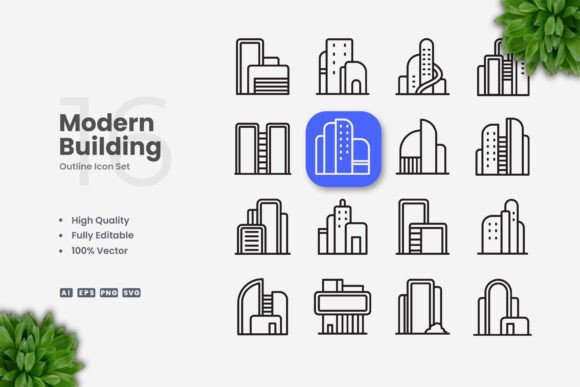
At its core, this set delivers 100 vector-based building icons. The files include source formats such as Adobe Illustrator (AI), EPS version 10, SVG, and PNG with transparency, along with a readme file for quick reference. The icons are described as high quality, customizable, and featuring editable strokes—meaning you can adjust line weight, color, and size using standard vector software like Adobe Illustrator or CorelDRAW without losing crispness.
The collection focuses exclusively on building-related symbols. You will find representations of houses, skyscrapers, commercial structures, factories, and similar architectural forms. The style is simple and clean, avoiding excessive detail or ornamentation. This makes the icons suitable for scenarios where clarity and rapid recognition matter more than artistic flair.
One practical advantage is the drag-and-drop ease of use. Because the files come in layered, editable vector formats, you can open the AI or EPS file, select the icon you need, and place it directly into your layout. No need to recreate shapes from scratch. For designers working on tight deadlines, that convenience can be a real time-saver.
How This Set Compares with Other Icon Options
When you evaluate Modern Building Icons against other icon resources, several distinctions emerge. Understanding these tradeoffs helps you choose the right tool for each project.
Versatility vs. Specialization
Free icon libraries and stock icon sets often include hundreds or thousands of symbols covering many categories. They are versatile, but the building icons tend to be generic and may not match a consistent visual theme. In contrast, a specialized set like this one gives you a coherent style across all building symbols. Every icon shares the same stroke width, corner treatment, and level of abstraction. If your project uses multiple building icons, the visual consistency can strengthen your brand or message.
The tradeoff is choice. You get 100 icons, all in one style. If you need a very specific structure—say a wind turbine or a particular type of bridge—this set may not include it. Broader icon libraries might cover that niche, but at the cost of stylistic uniformity.
For real estate websites, property apps, or construction brochures where you need a handful of building symbols, the specialized set often works better. For a general-purpose presentation covering many unrelated topics, a larger, more diverse library may be more practical.
Editable Vectors vs. Static PNG or SVG
Many free icon sites offer SVG or PNG downloads, but they may not include the original editable files. When you download an SVG, you can sometimes edit it, but the stroke structure may be expanded or flattened, making weight adjustments difficult. Modern Building Icons includes AI and EPS source files, giving you full control. You can change stroke weight, modify fill colors, rotate elements, or combine icons without starting over.
This level of customization is valuable when your project has strict brand guidelines. For example, if your company uses a specific blue and requires a 2px stroke, you can open the file and make those adjustments in minutes. Static PNGs would force you to accept whatever style the designer chose. For print projects like posters or banners, where resolution and exact color matching matter, editable vectors are almost essential.
However, if you only need one or two icons and never plan to alter them, the extra flexibility may not justify the cost. A quick download of a matching SVG from a free site could be sufficient.
Quality vs. Quantity
When evaluating alternatives, consider the level of detail and polish. Stock icon sets from large repositories can sometimes feel generic or slightly inconsistent because different artists created them. A dedicated set like this one is often crafted as a unified collection. The icons are described as high quality, which usually means balanced proportions, aligned strokes, and careful spacing. If you place these icons next to premium illustrations or a polished UI, they should hold up visually.
On the other hand, quantity can matter for large projects. If you need icons for dozens of building types—apartment complexes, hospitals, schools, warehouses, parking garages, and more—you may need more than 100 symbols. In that case, you might combine this set with another resource or choose a larger library. Check the preview to see whether the included icons cover the categories you need before committing.
Strengths and Best-Fit Situations
Modern Building Icons excels in several common scenarios:
- UI and app design – Clean, simple icons work well in mobile menus or toolbars where space is tight and clarity is paramount. Editable strokes let you match the icon weight to your interface typography.
- Infographics and data visualization – When you illustrate building-related statistics—like construction trends, property values, or energy usage—these icons can serve as visual anchors without distracting from the data.
- Print materials – Flyers, brochures, banners, and posters benefit from vector icons that scale to any size without pixelation. The AI and EPS files output cleanly for CMYK printing.
- Social media and digital marketing – Consistent icon style across posts or ads can reinforce brand recognition. The PNG transparency option is handy for quick use in social media tools that do not support vector formats.
- Books and publications – Simple, clean icons are easy to reproduce at small sizes in print, and the editable stroke allows adjustment if the printed line looks too thick or thin on a given paper stock.
If your project falls into any of these categories, and you need a set of building symbols that look like they belong together, this collection is a solid fit. The drag-and-drop workflow reduces friction, and the editable nature gives you room to adapt as the project evolves.
Limitations and When You Might Need Another Option
No single icon set works for every situation. Here are some cases where you may want to look further:
- If you need photographic realism – This is a vector line-icon style, not a photo illustration or 3D render. For realistic building visuals, you would need photography or detailed rendering, not an icon set.
- If you require a full brand identity kit – Icons are one component. You may also need custom illustrations, patterns, or unique symbols that a pre-made set cannot provide.
- If your audience expects a different visual language – For example, a luxury real estate brand may prefer thin, elegant linework or full-color detailed illustrations. The clean, simple style of these icons may feel too utilitarian for high-end marketing.
- If you need animated or interactive icons – The set provides static vectors. If your project requires animated SVG or interactive elements, you would need to create those animations yourself using the source files as a starting point.
- If your project requires hundreds of building icons across multiple subcategories – The 100-icon limit may become a constraint. You might supplement with another set or commission custom icons for missing types.
Being aware of these limitations helps you avoid frustration. If your needs align with the set's strengths, it can be a productive choice. If not, you can invest your time and budget elsewhere.
Practical Decision Factors
When deciding whether Modern Building Icons is the right resource, consider the following:
Scope of Your Project
Do you need just a few building icons, or will the project rely heavily on architectural imagery? For a flyer about a new condo development, you might only use one or two icons—this set would be more than enough. For a comprehensive real estate app with icons for every room type, building feature, and amenity, you may need a broader collection.
Design Flexibility
How much control do you need over the final appearance? If your client requires exact stroke weights, specific colors, and the ability to resize without quality loss, the editable vector files are a clear advantage. If you can work with pre-styled icons and do not foresee changes, a simpler download might suffice.
Time and Budget
Time is a factor. Custom icon design costs significantly more and takes longer. A pre-made set with source files gives you a middle ground—you pay a modest price (presumably) and invest a small amount of time adjusting the icons to fit. If you value speed and consistency, this approach is efficient.
Alternative Approaches
You could commission a designer to create custom building icons for your brand. This yields unique artwork but costs more and requires back-and-forth revisions. You could use free icon sites, but you risk inconsistent style, limited customization, and potential licensing issues. Another option is to use a subscription-based icon service that offers thousands of icons across many categories. Those services often provide regular updates and broader selection, but the style may not be as tightly focused on modern, clean building symbols. The best choice depends on how much uniqueness, consistency, and control you need.
Realistic Use Case Examples
Example 1: A small real estate agency wants to update its website. They need icons for sections like "Buy," "Sell," "Rent," "Commercial," and "About." The clean line style of this set would match a modern, professional site. The designer can open the AI file, pick five icons, adjust colors to match the agency's palette, and export them as PNG or SVG. The whole task might take 30 minutes. An alternative—contacting a custom illustrator—could cost hundreds of dollars and take days.
Example 2: An app developer building a facility management tool. The app needs icons for building types, zones, and utilities. The developer can use the set for the most common symbols (offices, warehouses, parking) and supplement with custom icons for specialized items like cooling towers or server rooms. The editable files allow the developer to maintain consistent stroke weight across all icons used in the app. A broader free icon set might have the specialty symbols but lack the consistent style.
Example 3: A non-profit organization creates an annual report on urban housing. They want clean, simple icons to break up text and add visual interest. They avoid complex illustrations to keep the report accessible and easy to print. Modern Building Icons provides exactly what they need—unified, simple symbols that print well in black and white or grayscale. The PNG transparency files make it easy to place icons directly into their layout software.
Making an Informed Choice
When evaluating any icon set, consider the full picture: number of icons, file formats, editability, style consistency, and licensing terms. Modern Building Icons stands out for offering 100 editable, clean-line building vectors with a consistent look across the collection. It is particularly well suited for projects where you need professional, simple building symbols without starting from scratch.
However, it is not the only option, nor is it the best fit for every situation. If your project demands extremely detailed or highly specialized icons, or if you need a vast number of symbols across many categories, you may be better served by a larger library or custom commission.
Ultimately, the value of this set lies in its balance of quality, customization, and convenience. For designers and content creators who regularly need building icons for web, print, or mobile interfaces, it can be a practical addition to your toolkit. By weighing the factors above against your specific project needs, you can decide whether this set aligns with your work—or whether another route better serves your goals.