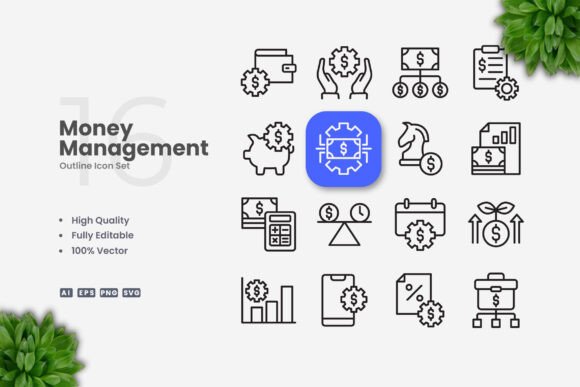
The Complete Guide to Using Money Management Icons for Modern Digital and Print Design
In visual communication, money management icons serve as a powerful shorthand for financial concepts, transactions, budgeting, and wealth tracking. These symbols reduce cognitive load by representing complex ideas like savings, investment, income, or expense in a single glance. Whether you are designing a fintech dashboard, a personal finance blog, an educational infographic, or a promotional flyer, the right set of money management icons instantly conveys meaning without relying on lengthy text. Their utility spans industries, audiences, and media types, making them an essential asset in any designer's toolkit.
Why Simple and Clean Icon Design Matters for Financial Communication
Financial content is inherently detail oriented. When users interact with money related interfaces or printed materials, clarity is paramount. Simple and clean icon design eliminates visual noise and focuses on core shapes that are universally recognized. A well crafted piggy bank, a dollar sign, a graph trending upward, or a wallet silhouette should be immediately identifiable even at small sizes. This minimalist approach reduces misinterpretation and speeds up comprehension, especially in mobile app interfaces where screen real estate is limited.
Clean icons also align with modern design trends that favor flat or outline styles. Unlike overly detailed illustrations that may appear dated or cluttered, simple vector based money management icons maintain a professional and polished appearance across different platforms. They blend seamlessly with both light and dark backgrounds, scale without pixelation, and retain legibility when printed at low resolutions. For businesses, this translates into consistent brand presence across websites, social media graphics, and printed collateral.
Core Characteristics of Effective Money Management Icons
An effective icon set for money management must balance specificity with versatility. Icons should represent distinct financial actions such as depositing, withdrawing, transferring, budgeting, or investing. Each symbol must be culturally neutral enough to work in global markets while remaining unmistakably tied to finance. For instance, a stack of coins, a credit card, a bank building, and a percentage sign are universally understood within financial contexts.
Stroke weight consistency is another critical factor. When icons share a uniform stroke thickness, they appear cohesive as a set. Editable stroke icons allow designers to adjust weight to match their brand guidelines or to meet accessibility standards, such as ensuring sufficient contrast for visually impaired users. High quality vector files make these adjustments straightforward in applications like Adobe Illustrator or CorelDRAW, where changing stroke weight, color, or curvature does not degrade the shape quality.
Applications Across Digital and Print Media
Money management icons are not confined to a single use case. Their adaptability makes them suitable for a wide range of projects. Below are several common applications where these icons add value.
Website and Mobile App Interfaces
For financial technology platforms, icons guide users through complex workflows. A budgeting app might use icons for categories like groceries, utilities, entertainment, and rent. A banking portal could employ symbols for account overview, fund transfer, bill pay, and transaction history. Because money management icons are vector based, they render crisply on retina displays and adapt to responsive layouts without losing detail. Designers can drag and drop SVG files directly into frontend code or export PNG files for quick integration.
Social Media Graphics and Infographics
Social media posts about personal finance, investing tips, or money saving challenges benefit from strong visual cues. Icons break up text heavy content and increase engagement rates. In infographics, money management icons act as visual anchors that guide the reader through statistics, timelines, or step by step guides. For example, an infographic about compound interest might use a growing plant icon combined with coins, while a debt reduction plan could show arrows moving downward alongside a wallet. The ability to change color easily means icons can match brand palettes or highlight specific data points.
Print Materials: Flyers, Brochures, Posters, and Banners
Printed financial documents often require symbols that are legible at multiple scales. A poster promoting a financial literacy workshop might need large icons that attract attention from across a room, while a flyer requires smaller icons that fit within columns. Money management icons in EPS or AI format can be scaled infinitely without resolution loss. For commercial printers, the editable stroke feature is especially useful because print plates may require different stroke thicknesses than digital proofs. The included readme.txt file typically provides guidance on file usage and color mode settings for CMYK printing.
Educational Materials and Books
Textbooks, ebooks, and teaching resources on economics or personal finance rely on icons to illustrate concepts like supply and demand, interest rates, or diversification. Educators and researchers can use money management icons to create consistent visual language across chapters. Because the icons are 100 percent customizable, instructors can adapt them for different grade levels or subject depths. For example, an elementary school workbook might use simplified coin and bank icons, while a university textbook could employ more abstract symbols for investment vehicles.
Customization and Technical Flexibility
One of the strongest selling points of a professional icon set is the degree of customization it offers. The phrase 100 vector and 100 customizable indicates that every element within the collection can be modified without constraints. This means you can resize icons for a poster or a mobile button, change colors to match a brand, and edit stroke weight to meet legibility standards. Because the source files include Adobe Illustrator AI files and EPS version 10, even legacy design software can open and edit the artwork.
Drag and Drop Workflow
Modern designers value efficiency. The easy drag and drop functionality means you can open the SVG or PNG folder and immediately place icons into your project. No time wasted on manual imports or file conversions. This is particularly useful when working on tight deadlines for multiple deliverables such as a series of social media posts, a website mockup, and a printed banner, all requiring the same icon set but in different formats and resolutions.
File Formats and What They Enable
The inclusion of multiple file formats ensures that the icons are accessible regardless of the end platform. SVG files are ideal for web development because they are scalable and can be styled with CSS. PNG files with transparent backgrounds are ready to drop into documents, presentations, or image editors. The AI source file is best for designers who want to make deep edits, such as adjusting anchor points, merging shapes, or creating custom variations. EPS version 10 provides backward compatibility for older design environments. The readme.txt file typically includes font credits, color mode recommendations, and licensing notes, which helps users avoid common technical pitfalls.
Understanding the Design Philosophy Behind Simple and Clean Icons
Simplicity in icon design is not about omission but about distillation. A well designed money management icon captures the essence of a financial concept using the fewest possible lines and shapes. This design philosophy aligns with the cognitive principles of recognition: the human brain processes simple shapes faster than complex ones. When an icon is reduced to its fundamental geometry, it becomes more memorable and easier to locate within a crowded interface.
Clean design also facilitates accessibility. High contrast outlines, generous spacing between shapes, and consistent stroke widths help users with visual impairments or cognitive disabilities perceive the icon correctly. For designers working on government or nonprofit projects, meeting Web Content Accessibility Guidelines (WCAG) is often a requirement. Simple vector icons with editable strokes allow designers to tweak contrast ratios and size thresholds without rebuilding assets from scratch.
Color and Context Flexibility
Because money management icons often appear in varied contexts, color flexibility is essential. A green icon may symbolize growth or profit in one interface, but the same icon in red might indicate a loss or expense. With 100 customizable vectors, you can assign meaningful colors to icons based on the data they represent. For instance, income icons could be colored green, expense icons red, and savings icons blue. This use of chromatic encoding reinforces understanding without additional labels.
Furthermore, clean outlined icons work well in both filled and unfilled states. Designers can use filled versions for active states in navigation menus and outline versions for inactive states, creating a clear interactive hierarchy. The ability to toggle between these states without redrawing the icon is a direct benefit of maintaining an editable stroke workflow.
Who Benefits from Money Management Icons
The audience for these icons is broad, encompassing professionals, consumers, creators, educators, researchers, hobbyists, and business owners. Each group interacts with the icons differently, but all benefit from the efficiency of visual communication.
- Professionals such as financial advisors, accountants, and analysts use icons in client reports, presentations, and dashboards to make data digestible.
- Consumers encounter icons in budgeting apps, banking websites, and personal finance tools, relying on them for quick navigation and understanding.
- Creators including graphic designers, web developers, and content marketers incorporate icons into diverse projects to maintain visual consistency and save production time.
- Educators and researchers leverage icons in teaching materials, surveys, and academic posters to illustrate abstract financial theories.
- Hobbyists who run blogs or YouTube channels about money management use icons to brand their content and make it more engaging.
- Business owners need icons for company websites, internal training documents, and customer facing communication to present a professional image.
Each of these user types benefits from the fact that the icons are high quality, fully customizable, and available in multiple file formats. The same set that works for a mobile app interface also serves a printed annual report, reducing the need to purchase or create separate assets for different mediums.
Considerations for Selecting and Implementing Money Management Icons
While a good icon set provides immense value, there are practical considerations to keep in mind during selection and implementation.
Licensing and Usage Rights
The product description does not include a preview mockup, but it does specify that the source files are included. Users should always review the license terms to understand whether the icons can be used in commercial projects, redistributed, or modified for resale. Most professional icon sets allow broad usage, but checking the readme.txt file or accompanying license document is a responsible practice.
File Organization and Naming Conventions
A well structured icon set uses clear file names that describe each icon. For example, a file named "wallet-outline.svg" is easier to locate than a generic name like "icon23.svg." Designers should maintain the original folder structure when downloading the set to preserve these naming conventions. This is especially important when collaborating with teams or when icons need to be replaced later without breaking existing layouts.
Testing for Scalability and Recognition
Before finalizing an icon for production, test it at various sizes. A money management icon that looks clear on a 24 pixel mobile button might become distorted or unrecognizable when scaled to 200 percent. Vector files solve this mathematically, but the visual balance of shapes can shift at extreme sizes. Similarly, test the icon with target users to confirm that the intended meaning is obvious. A symbol that the designer interprets as "investment growth" might be seen as "upward trend" or "stock market" by different audiences. Such ambiguity is acceptable in general contexts, but for specific functions, cultural and contextual validation is recommended.
Consistency Across a Set
When using multiple money management icons together, ensure they share a consistent style. Mixing thick outlined icons with thin outlined icons, or combining flat designs with gradients, undermines the professional appearance of the work. The advantage of a cohesive set is that all icons are pre harmonized in terms of stroke weight, corner roundness, and visual density. If you need to create additional custom icons that match the set, the editable vector source serves as a perfect template.
Future Trends in Icon Design for Financial Applications
As digital interfaces evolve, the role of icons continues to expand. With the rise of voice interfaces and augmented reality, icons may need to work alongside other interaction models. However, for the foreseeable future, visual symbols remain a primary mode of information display. Money management icons are likely to become even more interactive, with subtle animations or micro interactions that indicate state changes. For example, a savings icon might pulse gently when a new deposit is recorded, or a bill pay icon might have a loading animation. While static icons cover the majority of use cases, designers should keep an eye on motion design possibilities as they enhance user experience.
Another emerging trend is the integration of icons with data visualization. Instead of using separate icons and charts, designers might embed icons directly into graphs or progress bars. For instance, a coin icon could mark the starting point on a savings progress chart, and a target icon could indicate the goal. This requires icons that are not only clean and simple but also geometrically precise so they align with chart axes and grid lines. The editable stroke and scalable vector nature of high quality money management icons make them ideal for such hybrid applications.
Designing for accessibility will also continue to gain importance. Future icon sets may include multiple stroke weight variations for different optical sizes, as well as high contrast versions optimized for large print or projection. Designers who already work with editable stroke icons are ahead of this curve because they can quickly generate these variations on demand rather than waiting for the set to be updated by the creator.
Finally, as businesses increasingly operate across borders, icons must communicate across language and cultural barriers. A money management icon set that uses universally recognized symbols like coins, banknotes, credit cards, and graphs will remain relevant in global markets. Avoiding text heavy or culturally specific imagery ensures that the icons can serve diverse user bases without requiring localization.
Practical Workflow Tips for Designers
For those who are new to using vector icon sets, adopting an organized workflow will maximize the value of money management icons. Start by importing the SVG or AI file into your design software. Group icons by category such as banking, savings, income, expenses, investments, and payments. This grouping saves time when searching for specific symbols later. Next, create a master color palette and apply it to the icons using global swatches. This ensures that if the brand color changes, you can update all icons simultaneously.
When exporting for different platforms, pay attention to pixel alignment. For web use, set your artboard to exact pixel dimensions and enable snap to grid. For print, convert all colors to CMYK and set the resolution to at least 300 dpi. The EPS version 10 file is particularly useful for print because it retains vector data and is compatible with prepress workflows. Always keep the original source file untouched and work on duplicates to avoid accidentally overwriting the master icon set.
Document any customizations you make in a style guide. Note the stroke weight, corner radius, color hex codes, and any modifications to the original shapes. This documentation becomes invaluable when handing off files to other team members or when revisiting a project months later. Because the icons are 100 customizable, you have full creative control, but maintaining consistency across a project requires that control to be exercised deliberately.
Money management icons, when selected with care and implemented with attention to detail, become an invisible but essential layer of communication. They guide users, clarify data, and reinforce brand identity across every touchpoint. Whether you are designing for a startup app, a nonprofit financial literacy program, or a corporate annual report, investing in a high quality, clean, and customizable icon set pays dividends in user understanding and professional polish.