How to Choose the Right Networking Icons for Your Digital Projects
When you are building a website, designing a mobile app, or preparing materials for a presentation, the visual language you choose matters more than you might think. Among the most frequently used visual elements are networking icons—those small but powerful symbols that represent servers, routers, connections, data flows, clouds, and devices. A well-designed set of networking icons can save hours of work, improve user experience, and make your content look polished and professional. But not all icon sets are created equal, and understanding what makes a particular collection suitable for your needs requires a closer look at factors such as flexibility, file formats, editability, and overall design philosophy.
This article explores the practical considerations behind selecting networking icons, with a focus on simple and clean icon design. Whether you are a designer, marketer, developer, or business owner, understanding these nuances will help you make a more informed decision when choosing resources for your projects.
What Makes Networking Icons Distinct from Generic Icon Sets
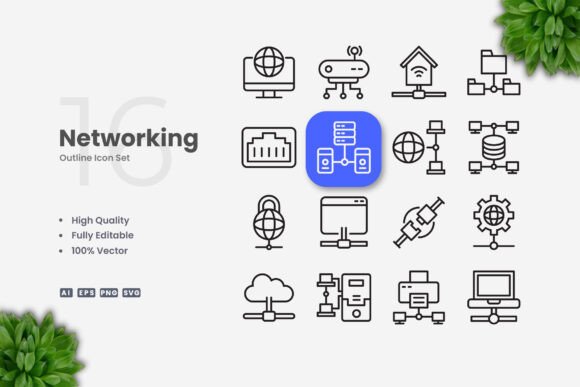
Networking icons occupy a specific niche within the broader world of iconography. Unlike generic icons that might cover everyday objects like envelopes, magnifying glasses, or shopping carts, networking icons are purpose-built to represent technical infrastructure, communication pathways, and digital systems. They often include symbols for network nodes, switches, firewalls, databases, cloud services, Wi-Fi signals, and connected devices. The best networking icon sets balance technical accuracy with visual simplicity, so that the symbols remain recognizable at small sizes and across different contexts.
A key differentiator of high-quality networking icons is the design approach. Simple and clean icon design means that each symbol is stripped down to its essential visual form. There are no unnecessary decorative elements, no overly complex gradients, and no ambiguous shapes. This minimalism is not just an aesthetic choice—it is a functional one. Clean icons scale better, render more clearly on low-resolution screens, and integrate more seamlessly into diverse layouts. They also tend to be more accessible, as users with visual impairments or cognitive differences can more easily parse simple shapes than cluttered ones.
When you evaluate a networking icon set, look for consistency in stroke weight, corner rounding, and visual balance. A set that offers editable strokes and customizable colors gives you the freedom to adapt the icons to your brand guidelines without starting from scratch. This is where the practical value of vector formats becomes apparent.
Vector Formats and Editability: Why They Matter for Real-World Use
One of the most important factors when choosing networking icons is the file format and the level of editability. Vector-based icons, such as those provided in AI, EPS, and SVG formats, offer significant advantages over raster images. Because vectors are resolution-independent, you can scale them from a small button to a large poster without any loss of quality. This makes them suitable for a wide range of applications, from mobile app interfaces to printed banners and infographics.
Beyond scalability, the ability to edit the icons directly in vector software like Adobe Illustrator or CorelDRAW is a game changer. You can resize individual elements, change the stroke weight to match your design system, or recolor the icons to align with your brand palette. This level of control means you are not locked into a predefined look. If your project requires a lighter stroke weight for a minimalist interface or a bolder outline for a poster, you can make those adjustments in minutes. The feature list often includes "editable stroke" and "100 customizable" precisely because these are the qualities that professionals look for when they need to maintain design consistency across multiple assets.
Another practical advantage is the inclusion of PNG files with transparency. Not every workflow is vector-based. Sometimes you need a quick drop-in image for a web page, a social media graphic, or a document. PNG transparency allows you to place the icon over any background without a white box around it. The combination of source files (AI, EPS, SVG) and ready-to-use PNG files gives you flexibility regardless of your technical setup.
Comparing Networking Icons with Alternative Visual Resources
When you are researching visual resources for your project, you will likely encounter several categories of icon products. Understanding how a dedicated networking icon set compares with these alternatives can help you decide where to invest your time and budget.
Custom illustration services are one alternative. Hiring a designer to create bespoke networking symbols gives you maximum originality, but it also comes with higher costs and longer turnaround times. For a one-off project with very specific requirements, custom work might be worth it. However, for most websites, apps, and marketing materials, a well-curated icon set provides a comparable level of quality at a fraction of the cost and effort. The tradeoff is that you are working within an existing library rather than inventing entirely new symbols.
Free icon collections are another common option. Many free sets include networking symbols, but they often come with limitations. The design quality may be inconsistent, the file formats might be restricted to PNG only, and the license terms can be ambiguous. More importantly, free icons are rarely editable. If you need to change a color or adjust a stroke weight, you may find yourself unable to do so without starting from scratch. A paid networking icon set, especially one that includes source vector files, removes these barriers. You gain both quality and control.
System-specific icon libraries exist within design tools like Figma or Sketch, and these can be convenient if you are working entirely within one ecosystem. However, they may not export cleanly to the file formats needed for print, video, or cross-platform use. A standalone set that includes AI, EPS, SVG, and PNG files is more versatile across different workflows and tools.
The distinct advantage of a dedicated networking icon set lies in the combination of focused content, clean design, and broad format support. You are not paying for hundreds of unrelated symbols you will never use. Instead, you get a curated collection that directly addresses the visual language of networks, systems, and digital infrastructure.
Where Networking Icons Excel: Strengths and Best-Fit Situations
Networking icons with a simple, clean design are particularly well suited for projects where clarity and professionalism are priorities. Here are some scenarios where they tend to be the right choice:
- Website interfaces that explain technical products or services, such as cloud hosting, cybersecurity solutions, or IT consulting. Icons help users quickly grasp complex concepts without reading lengthy text.
- Mobile apps with settings panels, network configuration screens, or dashboards. Small screen real estate demands icons that are instantly recognizable and do not rely on color alone to convey meaning.
- Infographics and data visualizations that map out network architectures, data flows, or system dependencies. A consistent icon set makes the graphic easier to follow and more visually appealing.
- Print materials such as flyers, brochures, and posters for tech events, product launches, or educational content. Vector icons ensure high-quality output at any print size.
- Ebooks and guides focused on networking topics, digital transformation, or IT best practices. Icons break up text and provide visual anchors for key concepts.
- Social media graphics for LinkedIn, Twitter, or Instagram posts related to technology, infrastructure, or business networking. Clean icons look professional and help your content stand out in crowded feeds.
- Presentations and slide decks where you need to communicate technical ideas to non-technical stakeholders. Icons reduce cognitive load and make your message more memorable.
In each of these cases, the ability to resize, recolor, and edit stroke weight is a practical advantage. You can create a cohesive visual system across all your materials without hiring a designer for every single asset.
Limitations and When Another Option May Serve You Better
No single resource is perfect for every situation, and networking icons have their limitations. Being aware of these tradeoffs will prevent frustration and help you choose the right tool for the job.
Specialized or highly technical symbols may not be covered in a general networking icon set. If your project involves niche hardware, proprietary protocols, or emerging technologies that do not yet have standard visual representations, you might need to supplement the set with custom icons. For example, a set might include a generic "server" icon but not a specific representation of a blade server or a particular network appliance. In such cases, having editable vector files is still helpful because you can modify an existing icon rather than creating one from scratch, but you should set realistic expectations about the breadth of the collection.
Artistic or highly stylized projects may require a different visual approach. Simple and clean icon design prioritizes clarity over creativity. If your brand uses a hand-drawn, illustrative, or highly decorative style, a minimalist icon set may feel out of place. For projects where visual personality is the primary goal, you might choose a custom illustration or a specialty icon set that matches your aesthetic, even if it sacrifices some editability or scalability.
Budget constraints are always a factor. While a dedicated networking icon set is generally affordable compared to custom design, it still represents an upfront cost. If your project is very small or purely experimental, you might start with a free alternative and upgrade later. Just be aware of the tradeoffs in quality, consistency, and editability that often come with free resources.
Team workflows can also influence your choice. If your team works across different operating systems and software environments, the variety of included file formats (AI, EPS, SVG, PNG) becomes a major advantage. However, if everyone uses a single tool like Figma exclusively, a set designed specifically for that ecosystem might integrate more smoothly. Consider your team's existing tools and processes before making a final decision.
Key Decision Factors When Evaluating Networking Icon Sets
To make a well-informed decision, here are some practical criteria you can use to evaluate any networking icon resource you encounter. These factors align with the features commonly listed in product descriptions and will help you compare options on a level playing field.
- Design quality and consistency: Are all icons drawn in a unified style? Do stroke weights and visual proportions feel harmonious? A cohesive set will look much more professional than a collection of mismatched symbols.
- File format availability: Look for sets that include AI, EPS, SVG, and PNG files. This combination covers most use cases from web to print and allows for maximum editability.
- Editability: Can you easily change colors, adjust stroke weights, or resize individual elements? Editable strokes and vector source files are essential if you plan to customize the icons.
- Number and relevance of icons: A set with 100 networking icons is likely to cover the most common symbols you need. Check the preview to see if the specific icons relevant to your industry are included.
- Licensing and usage terms: Ensure the license allows for commercial use, modification, and distribution as needed. Read the terms carefully to avoid legal issues down the line.
- Ease of use: Features like drag-and-drop simplicity, organized file naming, and a readme file with instructions can save time and reduce friction during the design process.
When you evaluate a product listing, pay attention to whether preview mockups are included or not. Some sets display icons within styled mockups to show visual context, but the actual files you receive are the raw icons themselves. This is standard practice. The value lies in the icons and their editability, not in the presentation templates.
Practical Examples: How Networking Icons Work in Real Projects
Let us consider two realistic scenarios to illustrate how the choice of networking icons can impact a project outcome.
Scenario A: A startup building a SaaS dashboard for network monitoring. The team needs icons for status indicators, device types, and connection states. They choose a clean networking icon set with editable strokes so they can adjust the stroke weight to match their UI design system. They export SVG files for the web interface and use PNG versions for the documentation. Because the icons are consistent in style, the dashboard looks coherent from day one. The startup saves hours of design time and avoids the cost of hiring a specialized illustrator.
Scenario B: A marketing agency creating a series of infographics about cloud networking. The client wants a professional look that is easy to understand. The agency selects a networking icon set with high-quality vector files. They resize the icons for different sections of the infographic, change colors to match the client's brand palette, and arrange them to visually explain data flow. The final product is clean, informative, and visually engaging. The agency appreciates that they can customize everything without needing to ask for permission or pay additional fees.
In both scenarios, the combination of focused subject matter, simple design, and flexible file formats makes the icon set a practical choice. The ability to edit and adapt the icons directly aligns with the needs of busy professionals who need reliable resources that do not introduce extra complexity into their workflows.
Making an Informed Choice That Fits Your Project
Selecting networking icons is ultimately about matching the resource to your specific requirements. There is no single best option for every situation. The right choice depends on your project's scope, your team's skills, your budget, and the visual style you want to achieve. By understanding the strengths and limitations of clean, vector-based networking icon sets, you can evaluate options more effectively and avoid surprises later in the design process.
If your work involves explaining technical concepts visually, creating interfaces that require clear symbols, or producing materials that span both digital and print media, a well-designed networking icon set is a strong candidate. The combination of high-quality design, editable vectors, and multiple file formats gives you the flexibility to adapt the icons to a wide range of uses without sacrificing consistency or professionalism.
On the other hand, if your project demands extremely specialized symbols, a highly artistic visual language, or a zero-cost solution, you may need to look beyond a standard icon set. In those cases, weigh the tradeoffs carefully. Custom illustrations or free alternatives might serve your immediate needs, but they often come with hidden costs in terms of time, consistency, or licensing restrictions.
Ultimately, the goal is to choose a resource that saves you effort, enhances your communication, and fits seamlessly into your existing workflow. A thoughtful evaluation based on design quality, editability, format support, and relevance will guide you toward the networking icons that best support your project's success.