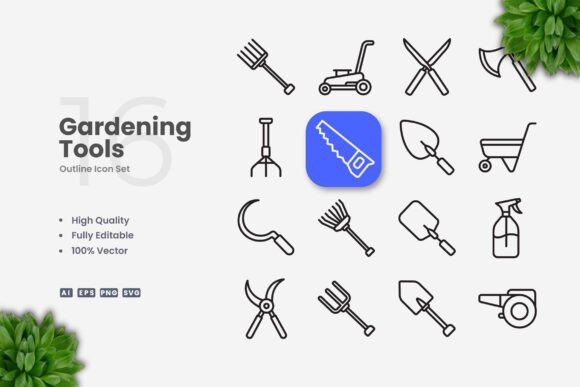
Gardening Tools Icons: A Practical Vector Set for Digital and Print Projects
When you are building a website, designing a mobile app, or preparing printed materials for a gardening-related business or publication, the visual assets you choose matter more than you might expect. Icons serve as visual shorthand, guiding users and readers quickly toward the information they need. A well-designed set of gardening tools icons can make the difference between a professional-looking project and one that feels unfinished. The vector icon set under discussion here offers a straightforward, customizable solution for anyone who needs clean, scalable graphics for gardening themes.
This article evaluates the Gardening Tools Icons set from a practical standpoint. We will look at what the set includes, its technical characteristics, and how it performs across different use cases. The goal is to help you decide whether this icon collection fits your workflow, your audience, and your project requirements.
What the Gardening Tools Icons Set Offers
This collection presents 100 vector icons centered on gardening tools and related imagery. The design philosophy leans toward simplicity and cleanliness, which means each icon avoids unnecessary detail while remaining immediately recognizable. You will find icons for common tools such as shovels, rakes, pruning shears, watering cans, gloves, pots, seeds, and more. The set stays focused on practical gardening equipment rather than decorative or abstract shapes.
The files arrive in several formats: AI (Adobe Illustrator), EPS version 10, SVG, and PNG with transparency. A readme.txt file is also included for quick reference. The inclusion of SVG files is particularly useful for web and app development, as SVGs scale without losing quality and can be styled with CSS. The PNGs with transparency provide a ready-to-use option for situations where vector editing is not needed.
Key Characteristics and Design Quality
The icons feature an editable stroke, which is a significant advantage for anyone who needs to adjust line weight or style. If you work in vector software such as Adobe Illustrator or CorelDRAW, you can open the AI or EPS files and modify stroke thickness, change colors, or adapt the icons to match your brand palette. This level of customization means the set can serve as a foundation rather than a fixed asset.
The high-quality design refers to the consistency of line work, the proportional spacing, and the visual balance across the collection. Each icon shares a similar visual language, so when you use multiple icons together, they feel cohesive. This consistency is often overlooked in smaller icon sets but matters greatly when you are populating a user interface or a printed layout with several symbols.
The simple and clean design approach also improves legibility at small sizes. Whether you are using these icons in a mobile app toolbar, on a website button, or in a printed flyer, the shapes remain clear. There is no clutter or excessive detail to break down when the icons are scaled down. Conversely, at larger sizes, the icons hold up well because the proportions are well judged.
Strengths of the Vector Format
Vector graphics are resolution-independent. You can resize these icons from a few pixels to several inches without any loss of sharpness. For print projects such as banners, posters, and flyers, this means you can place icons at any size without worrying about pixelation. For digital use, the SVG files allow for clean rendering on high-density displays, including Retina screens.
The editable stroke is another practical strength. In many icon sets, the stroke weight is locked or requires complex workarounds to change. Here, you can adjust the stroke to be thinner or thicker depending on the visual weight you need. If your project uses a bold typographic style, you might want thicker strokes for visual harmony. If your design is minimalist and light, thinner strokes may fit better. This flexibility reduces the need to search for multiple icon sets to match different design contexts.
Usability and Practical Value in Real-World Projects
The Gardening Tools Icons set is designed to be dragged and dropped into your projects. The files are organized so that you can quickly locate the icon you need and place it into your design software. The AI file is layered and labeled, which helps when you need to edit individual icons without disrupting others.
For web designers, the SVG files are particularly valuable. You can embed them directly into HTML, style them with CSS, and even animate them if desired. The PNG versions work well as fallbacks or for platforms that do not support SVGs easily. The inclusion of both vector and raster formats means you are covered for most delivery scenarios.
Who Benefits Most from This Icon Set
This collection is suitable for a broad audience, but certain groups will find it especially useful:
- Web and app developers building gardening-related platforms, e-commerce sites for plants and tools, or landscaping service portals will appreciate the scalability and consistency of the icons.
- Graphic designers creating brochures, flyers, posters, or banners for gardening stores, nurseries, or botanical events can use the icons as visual accents or as part of instructional graphics.
- Content creators and bloggers writing about gardening tips, tool reviews, or seasonal planting guides can integrate these icons into their social media graphics, infographics, or featured images.
- Publishers and educators producing gardening manuals, textbooks, or workshop materials can rely on the clear, legible iconography to support instructional content.
- Small business owners running nurseries, landscaping companies, or garden centers can use the icons on signage, promotional materials, and website elements to maintain a consistent visual identity.
- Freelancers and entrepreneurs who need a ready-to-use icon set for client projects will find the editable vector files save time and reduce the need to commission custom illustrations.
Real-World Performance and Limitations
In practice, the Gardening Tools Icons set performs well across both digital and print mediums. The icons retain clarity when printed at small sizes on flyers or at large sizes on posters. The PNG files with transparency integrate easily into layouts without background artifacts.
One limitation to note is the scope of the set. With 100 icons focused specifically on gardening tools, you may not find every tool you need if your project covers a very specialized area. For instance, if you need icons for power tools, irrigation systems, or greenhouse structures, this set may not cover those categories. However, for the core hand tools and common gardening objects, the coverage is solid.
Another consideration is the design style. The simple and clean aesthetic works well for modern, minimal, or professional layouts. If your project requires a highly illustrative, hand-drawn, or playful style, these icons may feel too structured. Always match the icon style to the overall visual tone of your project. For most business-oriented or educational gardening content, the style here is appropriate and effective.
Customization and Workflow Integration
The ability to change color and stroke weight means you are not locked into a default appearance. You can adapt the icons to dark mode, light mode, or any brand color scheme. In Adobe Illustrator, you can select individual paths, adjust stroke width, apply fills, or combine icons with other vector shapes. In CorelDRAW, the EPS files import cleanly and offer similar editing flexibility.
The drag-and-drop nature of the files reduces friction. You can keep the AI or EPS file open alongside your project file and copy icons as needed. For teams working with shared asset libraries, the SVG files can be stored and accessed collaboratively.
Long-Term Value and Reliability
Vector icon sets offer long-term value because they are not tied to specific software versions or screen resolutions. The AI and EPS formats have been industry standards for decades, and SVG is the dominant web vector format. You can archive these files and reuse them years later without worrying about format obsolescence. The readme.txt file provides basic instructions, which is helpful for less experienced users who may need guidance on opening and editing the files.
The consistency of the set also contributes to its long-term usefulness. If you build a website or a publication series around these icons, you can maintain a unified look across all materials. When you need to add new icons later, you can create them in the same style by referencing the existing proportions and stroke weights.
Presentation and Effectiveness
The effectiveness of an icon set depends on how well the icons communicate their meaning at a glance. In this collection, the tools are depicted in straightforward, recognizable ways. A shovel looks like a shovel, a rake looks like a rake. There is no ambiguity or abstraction that might confuse viewers. This clarity is especially important in instructional or informational contexts where users need to quickly identify actions or categories.
For infographics, the icons can serve as visual anchors for data points or steps in a process. For social media graphics, they can add visual interest without overpowering text. For print materials, they provide a polished, professional touch that elevates the overall design.
Practical Recommendations
If you are evaluating this Gardening Tools Icons set for your own use, consider the following:
- Assess your project scope. If your project requires icons beyond the 100 provided, you may need to supplement this set with additional icon packs or custom illustrations. For most gardening-related projects, however, the included icons will cover the essentials.
- Test the icons at your intended sizes. Open the SVG or AI file and preview the icons at the sizes you plan to use. Check legibility, especially for smaller UI elements or print details.
- Review the stroke weight against your design system. If you have established stroke weights for other interface elements, adjust the icons accordingly to maintain visual harmony.
- Use the SVG files for web projects. SVGs offer performance benefits and styling flexibility. They also reduce the number of HTTP requests compared to icon fonts or image sprites.
- Keep the AI and EPS files as source masters. Make your edits in the vector files and export PNG or other formats as needed. This preserves the ability to make future changes.
Final Thoughts on the Gardening Tools Icons Set
This icon collection provides a practical, well-crafted set of gardening tool symbols that can serve a wide range of digital and print projects. The 100 icons cover the most common tools and objects, the vector formats ensure scalability and editability, and the clean design style offers professional presentation without unnecessary decoration. The editable stroke and color customization give you control over the final appearance, making the set adaptable to different brand identities and visual contexts.
While the set is not exhaustive in its coverage, it delivers solid value for its intended purpose. Web developers, graphic designers, content creators, educators, small business owners, and freelancers working in gardening-related fields will likely find this collection meets their needs efficiently. If you require icons that are easy to use, easy to customize, and consistent across applications, this Gardening Tools Icons set is a reliable choice that balances quality with practical flexibility.