Election Icons: A Practical Guide to Clean Vector Graphics for Campaigns and Civic Design
When you need to communicate voting information, election processes, or civic engagement visually, the quality of your icons can make or break the message. Election Icons is a dedicated set of vector graphics built specifically for election-related design work. Whether you are creating a ballot instruction guide, a get-out-the-vote social media campaign, or an infographic on voter turnout, having a consistent, clean icon set saves time and ensures professional results. This article explores what makes Election Icons distinct, how it compares with broader icon libraries, where it fits best, and when you might need a different solution.
What Election Icons Offers
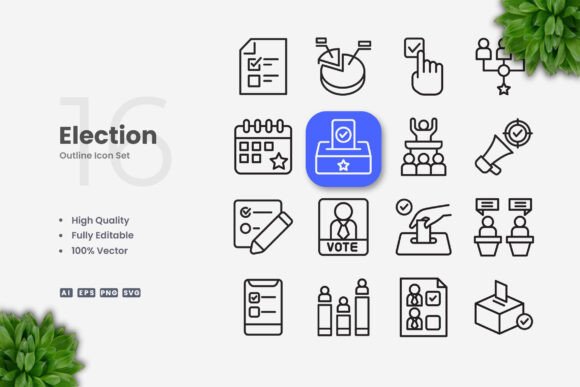
Election Icons is a focused collection of 100 vector icons centered on election and voting themes. Every icon is designed with a simple, clean aesthetic that works across multiple formats—websites, mobile apps, books, social media, infographics, flyers, banners, posters, and print materials. The set includes source files in AI, EPS 10, SVG, and PNG formats, plus a readme file for quick setup. Because the icons are fully vector, you can resize them without losing quality, change colors to match your brand, and edit stroke weights using vector software like Adobe Illustrator or CorelDRAW. The editable stroke feature is particularly useful when you need to match a specific visual style or ensure legibility at different scales.
What sets Election Icons apart from generic icon packs is its thematic focus. Instead of searching through thousands of unrelated symbols, you get a curated set that covers ballots, voting booths, checkmarks, candidate silhouettes, polling places, mail-in voting, and related civic imagery. This focus reduces decision fatigue and ensures visual consistency across your project.
Comparing Election Icons with General Icon Libraries
Many designers rely on large icon libraries that offer thousands of symbols across dozens of categories. These libraries have their place, but they come with tradeoffs. A general set might include a handful of election-related icons, but the styles often vary—some are outlined, some filled, some with rounded corners, others with sharp edges. Mixing icons from different sets can create an inconsistent look that undermines a professional design. Election Icons addresses this by offering a unified visual language. Every icon in the set shares the same stroke weight, corner style, and level of detail, so your final product looks cohesive.
Another difference is file organization. General libraries often package icons in a single large file or require you to download individual SVGs one by one. Election Icons comes with organized source files (AI and EPS) that let you drag and drop icons directly into your project. This workflow efficiency matters when you are working under a tight deadline or managing multiple assets. The inclusion of PNG transparency also helps if you need to use the icons in environments where vector editing is not available, such as Google Docs or Canva.
However, general libraries offer breadth. If your project needs icons beyond election themes—such as weather, transportation, or finance—a single-purpose set like Election Icons will not cover those needs. You would either need to supplement with additional icon packs or design custom symbols. This is a classic tradeoff: specialization versus versatility. For a focused election project, specialization wins. For a broader campaign that covers multiple topics, you might combine Election Icons with a neutral base set.
Strengths and Best-Fit Situations
Election Icons excels in several common scenarios. Below are the situations where this set is likely the right choice.
Voter Education and Ballot Instructions
Clear, non-partisan instruction is critical for democratic participation. A ballot guide that uses consistent icons helps voters understand how to mark their choices, where to sign, and how to submit their ballot. The clean design of Election Icons reduces cognitive load—voters can quickly scan and interpret the visuals without deciphering complex graphics. The editable stroke feature lets you adjust line thickness for better readability on small screens or printed ballots.
Social Media Campaigns and Infographics
Social media posts need to grab attention quickly. Simple icons with high contrast work best. Election Icons are optimized for this environment: they scale down cleanly for profile images and scale up for cover photos or carousels. When you need to create a series of posts about registration deadlines, polling hours, or early voting, having a consistent icon set keeps your visual identity intact. For infographics, the ability to change icon colors lets you match your brand palette or use color coding to differentiate categories like registration, voting, and results.
Print Materials and Banners
Flyers, posters, and banners often require large-format output. Vector icons are essential here because raster images become pixelated when scaled. Election Icons, being 100% vector, remain sharp at any size. The EPS 10 format is widely supported by printing services, so you can hand off files without conversion issues. If you need to produce bilingual or multilingual materials, the icons themselves are language-neutral—a checkmark or ballot box communicates without translation.
Mobile Apps and Websites
For civic tech apps or election information websites, icon consistency improves user experience. Navigation buttons, status indicators, and action prompts benefit from a unified visual system. SVG files are lightweight and render crisply on retina displays. The easy drag and drop feature mentioned in the file structure means developers can import icons directly into design tools or codebases. You can also modify stroke weight to meet accessibility guidelines, such as ensuring minimum touch targets for mobile buttons.
Tradeoffs and Limitations
No single icon set is perfect for every project, and Election Icons has limitations worth considering. Understanding these tradeoffs helps you decide when this set is a good fit and when you might look elsewhere.
Limited Scope
The set contains exactly 100 icons, all within the election theme. If your project requires icons for related but distinct topics—such as community meetings, petitions, or town hall events—you may not find a direct match. You could repurpose existing icons (a speech bubble for town hall, for example), but the fit may not be perfect. For highly specialized needs, you might need to commission custom icons or expand your search to a more comprehensive library.
Style Constraints
The clean, minimal style is a strength for many applications, but it may not suit every brand. Some organizations prefer illustrated, hand-drawn, or highly detailed iconography that feels more organic or warm. Election Icons are intentionally neutral and straightforward, which works for official, non-partisan materials but may feel too generic for a grassroots campaign that wants a distinctive visual identity. You can change colors and stroke weights, but the underlying shapes are fixed. If your brand requires unique icon proportions or a specific artistic direction, a custom set might serve you better.
File Format Considerations
While the set includes AI, EPS, SVG, and PNG files, it does not include formats like PDF, WebP, or icon font files. If your workflow relies on icon fonts (e.g., for web development), you would need to convert the SVGs into a font using a tool like IcoMoon or Fontello. This adds an extra step. Similarly, if you work primarily in Figma or Sketch, the AI and EPS files may require import adjustments. The included PNGs are a helpful fallback, but they are fixed resolution and lack the flexibility of vector source files.
When Election Icons May Not Be the Right Choice
Here are several situations where a different approach might work better.
- Your project needs a large volume of varied icons across multiple themes. A broad icon library with consistent styling offers better value for general-purpose design work. Election Icons is a complement, not a replacement, for a versatile set.
- You require highly specific or localized imagery. Some election systems have unique symbols—like preferential voting arrows, ranked-choice ballots, or regional party emblems. A 100-icon set may not cover every local variation. You might need to supplement with custom designs.
- Your brand uses a non-standard visual language. If your brand guidelines specify duotone icons, isometric perspectives, or animated graphics, Election Icons would need significant modification. Starting from a blank canvas with a custom designer might be more efficient than retrofitting an existing set.
- You need icon fonts for web performance. While SVG files are performant, icon fonts offer even better caching and single-file loading. If your development team uses font icons exclusively, the lack of a ready-made font file could be a drawback. However, converting SVG to font is straightforward with common tools.
Decision Factors to Consider
When evaluating whether Election Icons is the right choice for your project, weigh the following factors.
Project scope. If election-related visuals are the central focus, the thematic focus of this set is a clear advantage. If election icons are just one small part of a larger project, a general library might be more practical.
Timeline and budget. A pre-made set like Election Icons is far faster and cheaper than custom design. If you need to produce materials in days rather than weeks, buying a focused set is a smart investment. Custom icons can cost hundreds or thousands of dollars depending on complexity and quantity.
Consistency requirements. For official, non-partisan materials—such as government voter guides or election board communications—a clean, neutral style is often required. Election Icons meets that brief well. For advocacy or partisan campaigns, you might want a more distinctive look that sets you apart.
Technical workflow. If your team works primarily in Adobe Illustrator or CorelDRAW, the source files integrate seamlessly. If you use web-first tools like Figma or Sketch, the SVG files are compatible, though you may need to adjust import settings. The included PNGs are helpful for quick mockups or non-designers who need to drop icons into documents.
Practical Tips for Using Election Icons
To get the most out of this set, consider the following practices.
- Start with the source file. Open the AI or EPS file in your vector software first. This gives you access to all 100 icons in one document, making it easy to browse, select, and copy.
- Test stroke weight early. Before applying icons across your project, test different stroke weights at the actual display size. A weight that looks good on a poster may appear too heavy on a mobile screen. Use the editable stroke feature to find the optimal balance.
- Create a color palette. Since you can change colors freely, define a palette of 2–4 colors that align with your brand or the context. For election materials, consider using your brand color for primary actions, a neutral gray for secondary elements, and a high-contrast color for alerts or calls to action.
- Combine with text wisely. Clean icons work best when paired with clear typography. Avoid placing text too close to icons; give each element breathing room. Consistent spacing across the entire set enhances the professional look.
- Use the PNGs for quick prototyping. During early design stages, the PNG files let you test layouts without opening vector software. Once the layout is approved, replace them with the SVG or AI versions for final output.
Making an Informed Decision
Election Icons is a practical, well-organized resource for anyone creating visual materials around voting and civic participation. Its 100 clean, scalable icons cover the essential election imagery most projects need, and the editable stroke feature adds flexibility that many generic sets lack. The included file formats—AI, EPS, SVG, and PNG—support common workflows from design to development to print.
At the same time, its specialized focus means it is not a universal solution. If your work spans many unrelated topics, or if your brand demands a highly distinctive visual language, you will likely need to supplement this set with other resources. The key is matching the tool to the task. For a focused election campaign, voter education initiative, or civic engagement project, Election Icons offers a reliable foundation that saves design time and ensures visual consistency.
Ultimately, the best choice depends on your specific project requirements, budget, timeline, and brand identity. By understanding both the strengths and the limitations of this icon set, you can make a more informed decision—and produce designs that communicate clearly and effectively with voters and the public.