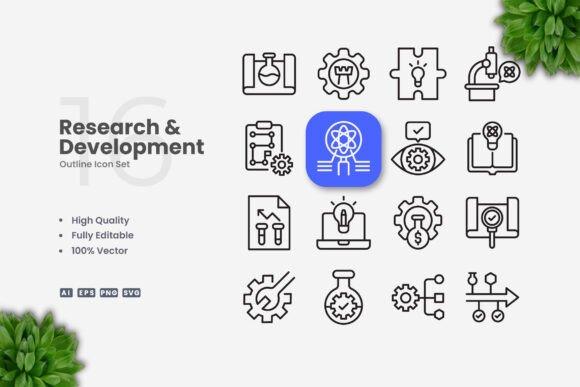
Research and Development Icons: Practical Icon Sets for Real Projects
Icons are everywhere. They guide us through apps, help us scan documents quickly, and make presentations far more digestible. But not all icon sets are created equal. When you need visuals that represent innovation, testing, prototyping, or scientific discovery, generic icons often fall flat. That is where a dedicated collection like Research and Development Icons becomes genuinely useful. Instead of hunting for symbols that sort-of fit your concept, you get a focused library of vectors designed specifically for R&D themes. Think beakers, microscopes, gear mechanisms, lightbulbs, data charts, and lab equipment, all rendered in a simple, clean style that works across nearly any medium.
What Makes Research and Development Icons Different
At its core, this set is a collection of 100 vector icons built around research and development topics. But the real value lies in how the icons are constructed. Each icon uses an editable stroke weight, meaning you can adjust the thickness of the lines without breaking the design. That matters more than most people realize. If you have ever tried to resize a raster icon only to watch it become blurry or distorted, you understand why vector formats are essential. With these files, you get source AI, EPS 10, SVG, and PNG transparency formats. That covers nearly every workflow, whether you are designing in Adobe Illustrator, CorelDRAW, or even editing SVGs directly in a code editor.
The design philosophy here is simple and clean. No excessive gradients, no overly complex details that disappear when scaled down. Each icon retains clarity whether it is displayed as a tiny app button or blown up on a poster. That makes the set reliable for projects where legibility and professionalism matter.
Presentations and Pitch Decks
If you have ever stood in front of a room full of stakeholders trying to explain a new product concept, you know how much visuals matter. Slides filled with dense text lose attention fast. Icons break up the monotony and give the audience visual anchors. With Research and Development Icons, you can illustrate stages of product development, highlight key findings from user testing, or show the progression from idea to prototype. A simple gear icon next to a list of engineering milestones or a magnifying glass beside user research findings makes the slide instantly more scannable.
Website and App Interfaces
Digital products benefit enormously from consistent iconography. Whether you are building a dashboard for a SaaS platform or a project management tool for R&D teams, having a matching set of icons improves usability. Users learn to associate certain symbols with specific actions. A flask icon for experiments, a clipboard for test results, a network node for system architecture. When the icons share the same stroke weight and visual language, the interface feels cohesive. That reduces cognitive load and makes navigation feel intuitive.
Infographics and Reports
Researchers, educators, and data analysts often need to present complex information in a digestible way. Infographics are a common solution, but creating one from scratch takes time. With a dedicated icon set, you can pull relevant symbols directly into your design and focus on the layout and messaging. For instance, an infographic about the innovation pipeline could use icons for ideation (lightbulb), prototyping (wrench and gear), testing (beaker), and launch (rocket). The clean line style ensures the icons do not compete with the text or data visualizations.
Social Media Content and Blog Graphics
Marketers and content creators know that posts with visuals perform better. But sourcing images that match your brand and topic can be tedious. Research and Development Icons give you a library of ready-made visuals for LinkedIn posts, Instagram carousels, Twitter threads, or blog featured images. If you are writing an article about the future of biotech or how to streamline product development, these icons help you create a consistent visual identity across your content. You can change the color to match your brand palette in seconds, which keeps your feed looking polished without needing a designer every time.
Educational Materials and E-Books
Teachers, trainers, and online course creators often need visuals that explain concepts clearly. A textbook or e-book about engineering principles, scientific methods, or business innovation can use these icons to illustrate key points. Since the icons are vector files, they scale perfectly for both print and digital formats. You can insert them as inline illustrations, use them as section dividers, or create visual summaries at the end of chapters. Students process information faster when it is paired with consistent, simple visuals.
Print Materials: Flyers, Banners, Posters
Whether you are promoting a science fair, advertising a workshop on innovation, or designing a poster for a research conference, clean icons make your materials look professional. Because the stroke weight is editable, you can adjust the icons to work in large formats like banners without them looking thin or lost. Print designers appreciate having PNG transparency files as well, which allow for quick placement without background issues. The same icon that works at 16 pixels in an app can be scaled to 200 millimeters on a poster without losing quality.
Real Scenarios Where This Icon Set Shines
Imagine a freelance graphic designer hired to create a brand identity for a biotech startup. The client wants a modern, minimal look that still communicates science and innovation. Using Research and Development Icons, the designer can quickly build a visual library for the brand, including icons for the website, business cards, and product packaging. Because the icons share a consistent line style and weight, the brand feels unified from day one.
Or consider a product manager putting together a quarterly review for the executive team. They need to show metrics around R&D spend, project timelines, and resource allocation. Instead of using generic clip art, they pull icons from this set that directly relate to each section. The result is a report that looks custom-made, even though it was assembled in a few hours.
Another scenario involves a blogger who writes about emerging technologies. Every post needs a featured image and several supporting visuals. Rather than hiring a designer for each piece, the blogger uses the SVG files to create custom graphics quickly. Changing the stroke weight and color in Illustrator takes seconds, and the PNG exports are ready for WordPress or Medium.
Small business owners running innovation workshops or consulting sessions also benefit. Handouts, worksheets, and slide decks become more engaging when they include relevant icons. Participants can more easily follow along when visual cues reinforce the spoken content.
What to Consider Before Using This Icon Set
Before you download and start using Research and Development Icons, think about the context of your project. The set is designed around research and development themes, so it is perfect for science, engineering, product development, and innovation topics. If your project is entirely unrelated, like real estate or fashion, you will likely only use a small subset of the icons.
Also consider the file formats you need. The set includes AI, EPS 10, SVG, and PNG Transparency. If you work primarily in a vector editing application like Adobe Illustrator or CorelDRAW, the AI and EPS files will be your go-to. If you are a web developer or a UI designer, the SVG files offer the most flexibility because they can be styled with CSS and scaled without resolution loss. The PNG Transparency files are helpful for quick mockups or when you need to place icons directly into a document without additional software.
The editable stroke weight feature is particularly useful if you are combining icons from multiple sources. You can match the line thickness of this set to other icons you already own, creating a consistent look across your entire project. That level of control is rare in free icon sets, which often lock the stroke weight and color.
Another consideration is the preview mockup. The product listing clearly states that mockups are not included. You receive only the icon files themselves. That is standard for icon sets, but it is worth noting if you expected ready-made presentation slides or scene mockups. The icons are raw material for you to use in your own designs.
Connecting Features to Real Outcomes
The high-quality design is not just a marketing phrase. When you use these icons in a client presentation, the clean lines and proportional shapes signal professionalism. Clients notice the difference between a rushed icon and one that has been carefully constructed. The 100 vector format means you have enough variety to cover most R&D topics without repeating the same symbol over and over. That variety helps you maintain visual interest across multiple pages or screens.
Customizability is another practical advantage. If you need icons in a specific brand color, you can change the stroke or fill in one click. If you need them thinner or thicker for a particular layout, you adjust the stroke weight globally if your software supports linked assets. This flexibility saves time and reduces the frustration of working with rigid files.
Easy drag and drop functionality applies to most modern design tools. Once you unzip the folder, you can drag SVG or PNG files directly into your project panel. No complex import steps or file conversions. That matters when you are working under a tight deadline and need to move fast.
The inclusion of a Readme.txt file is a small touch, but it helps users who might be unfamiliar with vector formats or need quick guidance on file usage. It shows the seller understands that not every buyer is a design expert.
Final Thoughts on Using Research and Development Icons
Icons are a small part of any project, but they carry a lot of weight in terms of user experience and professionalism. A dedicated set like Research and Development Icons removes the guesswork of finding appropriate visuals for innovation-focused work. Whether you are a marketer building a campaign, a teacher preparing a course, or a developer designing an app, having a reliable, customizable icon library saves you time and helps you produce better results.
The simple and clean design approach ensures these icons will not look outdated in a few years. Trends come and go, but clear, minimal line art remains effective across contexts. By choosing a set that prioritizes legibility and flexibility, you are investing in a resource that will serve you across multiple projects, not just one.